Article 14 has applied since 11 September 2026Art. 71(2)
Your 24-hour clock under the Cyber Resilience Act.
If a vulnerability in something you ship is being actively exploited, EU law requires an early warning within 24 hours of you becoming aware — nights and weekends included. Declara watches your components, tracks the clocks from when you became aware, and drafts all three filings.Art. 14(2)(a)
or check an SBOM for freeNo card · from €59 per product a month. One product during the trial. When the 14 days are up the workspace turns read-only until you choose a plan, and nothing is deleted.
Matched hourly against CISA KEV and ENISA’s EUVD; daily against NVD, OSV, GHSA and EPSS.
Counted from when you become aware — in Declara you record that moment, and it can be earlier than when you record it. The same arithmetic the product uses.
- Maximum fine
- €15Mor 2.5% of turnover, whichever is higher
- Applies to
- EU marketwherever the company is based
- First filing due
- 24hfrom becoming awareArt. 14(2)(a)
See it work
Alert, assessment, filing
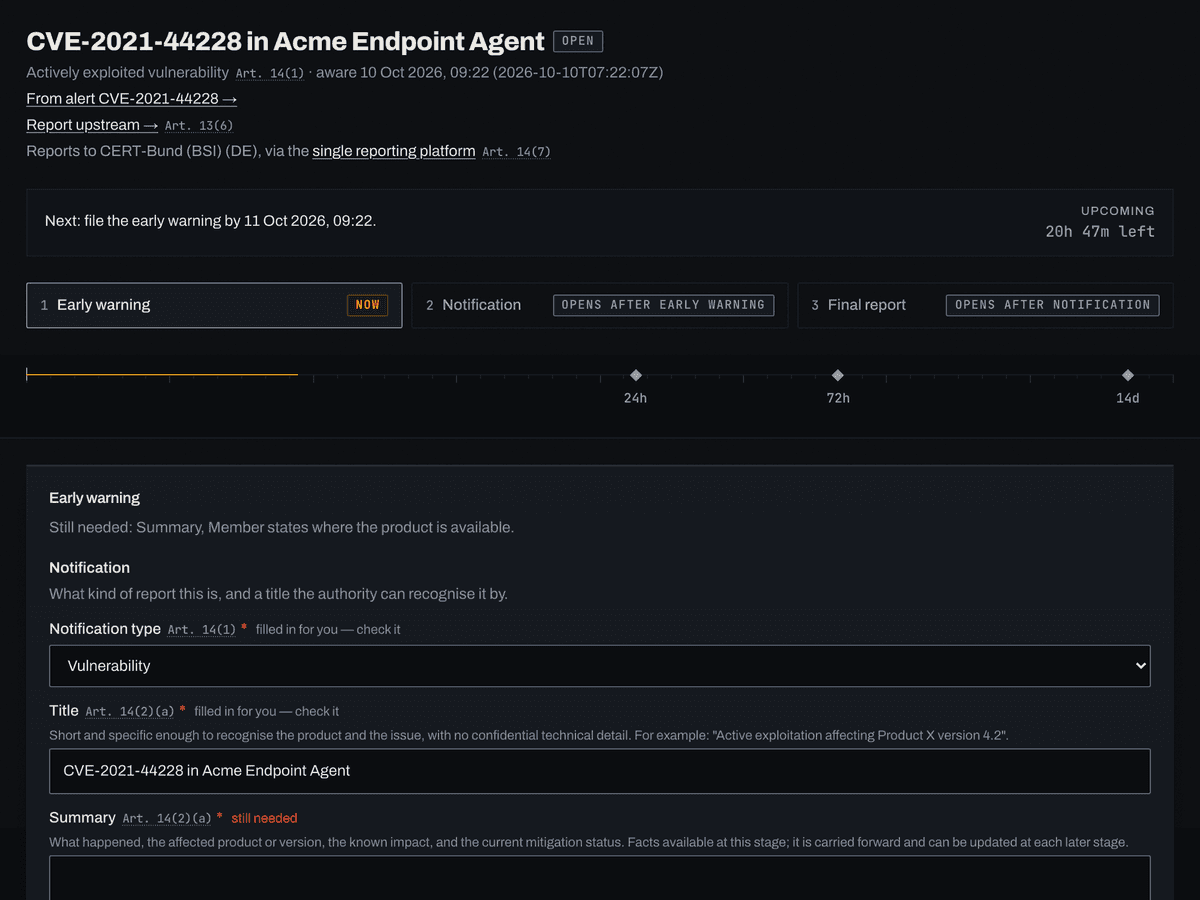
Not a video and not screenshots. The questions below come from the product, the deadlines are computed by the same arithmetic, and the filing is written by the same code that writes a customer’s. Click through it.
A worked example, running the real product
- 01Alert
- 02Assess
- 03File
CVE-2021-44228
Actively exploitedRemote code execution in Apache Log4j 2
- Severity
- 10.0CVSS, out of 10
- Exploitation probability
- 94.4%EPSS, next 30 days
- Listed as exploited
- 2021-12-10
- CISA catalogue
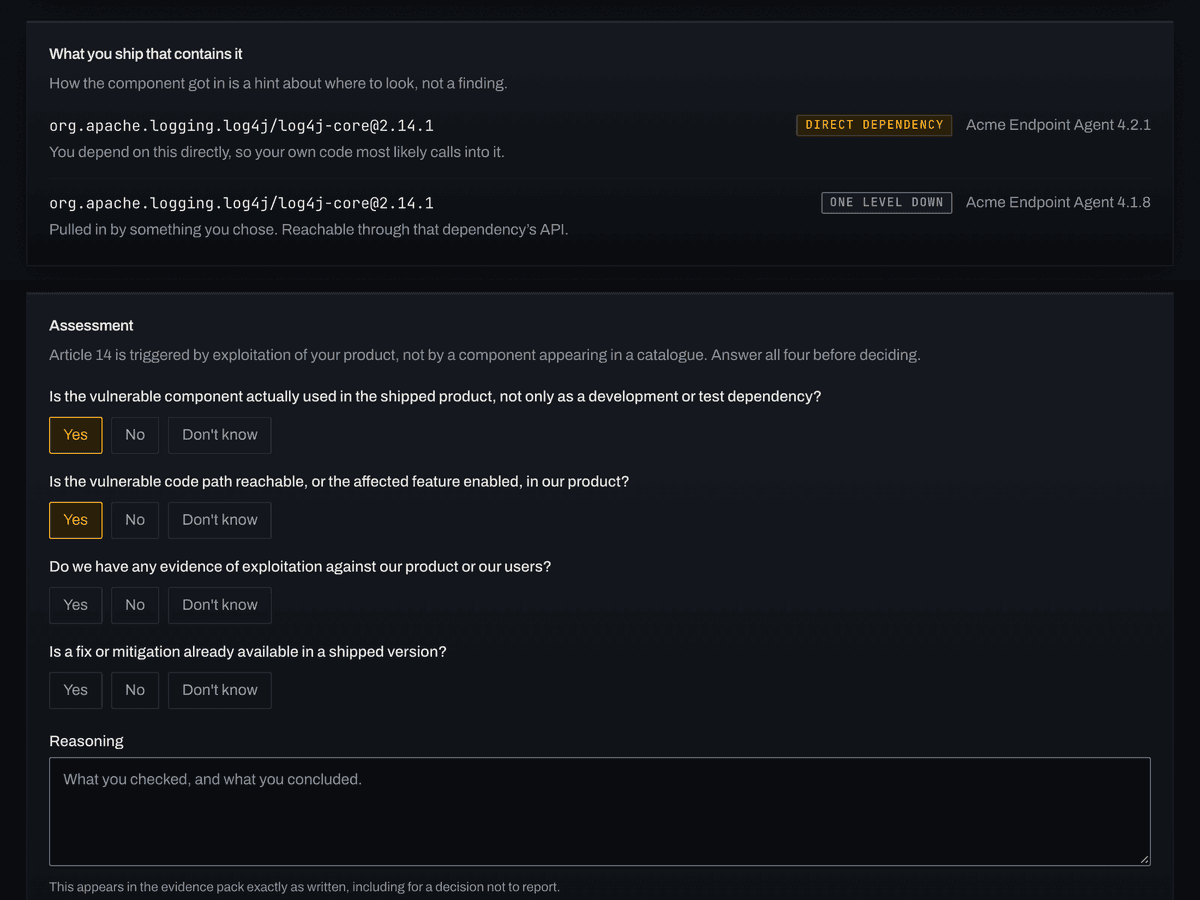
What you ship that contains it
- org.apache.logging.log4j/log4j-core@2.14.1Acme Endpoint Agent 4.2.1
- org.apache.logging.log4j/log4j-core@2.14.1Acme Endpoint Agent 4.1.8
No clock has started. A component appearing in an exploitation catalogue means someone, somewhere, is exploiting it. Whether your product is affected is a separate question, and it is the one Article 14 turns on.Art. 14(1)
What comes out
What it leaves you with
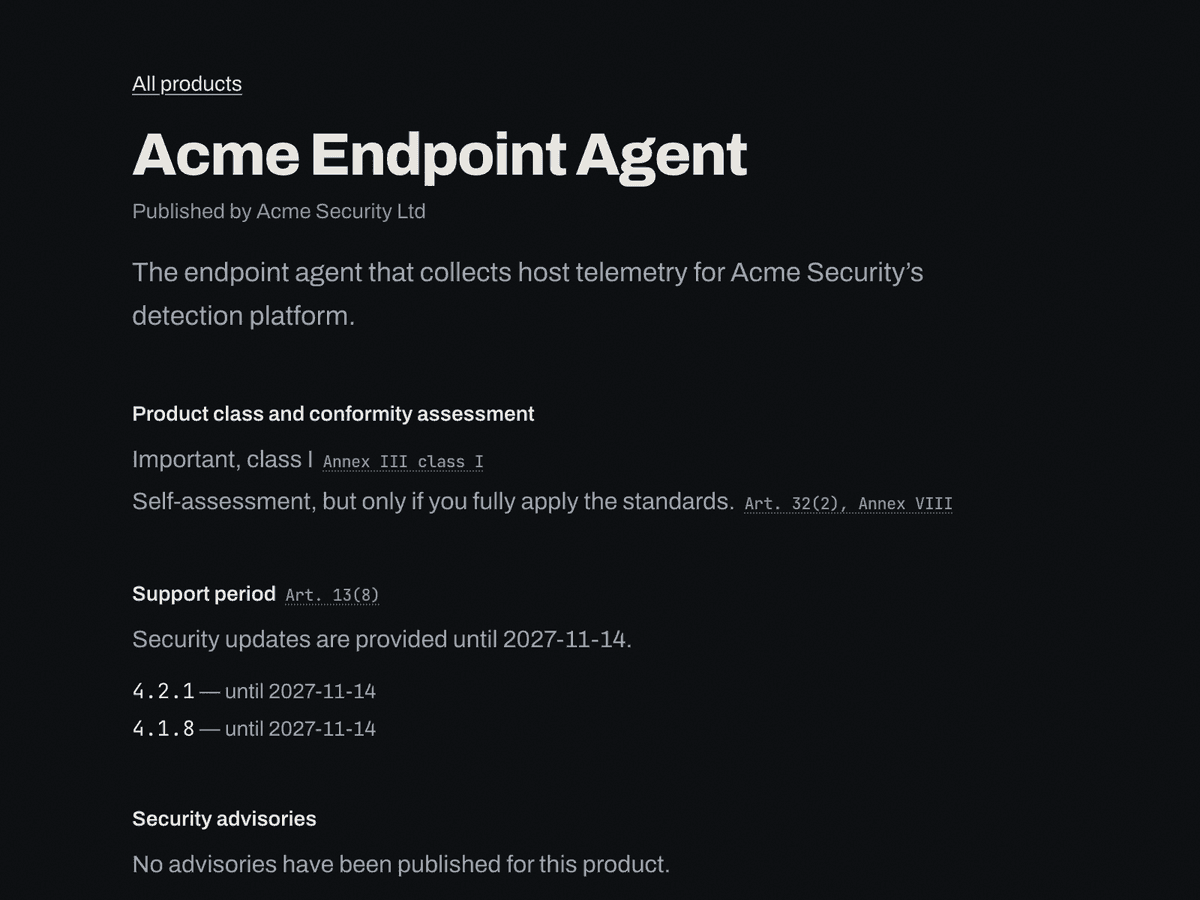
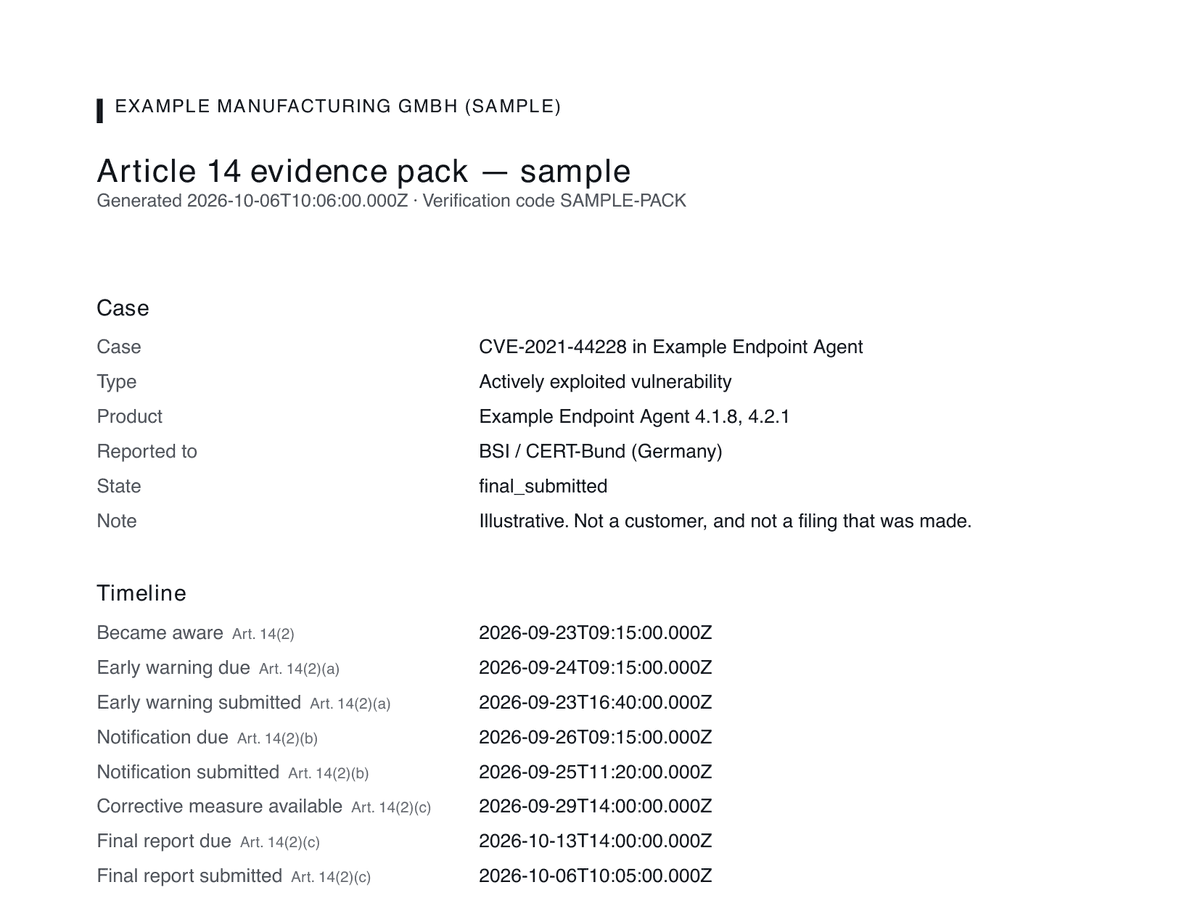
Three screens from a demo workspace and the first page of the sample evidence pack. Every company in them is invented. Each one links to the real thing.
Find out in thirty seconds
Is anything you already ship being exploited?
Drop in the SBOM you already generate. We match it against the CISA catalogue of vulnerabilities being exploited in the wild and show you exactly what comes back.
Drop an SBOM, or choose a file
- Format
- CycloneDX SPDX
- Encoding
- JSON · XML JSON · tag-value
- Size
- up to 4 MB
Nothing is storedParsed in memory and discarded. No account, and no record of what you ship — we keep the count of how many components came back, never their names.
I do not have an SBOM
A software bill of materials is the list of every open-source component inside something you ship, with its version, written in a format other tools can read. Syft is a free tool from Anchore that builds one for you by reading a container image, a source directory or a binary. It takes a minute, and you only need it once per release.
# 1. Install it, on macOS
brew install syft

# ...or anywhere else
curl -sSfL https://get.anchore.io/syft | sh -s -- -b /usr/local/bin

# 2. Point it at what you ship
syft acme/agent:latest -o cyclonedx-json > sbom.json

# ...or at a source directory
syft dir:. -o cyclonedx-json > sbom.json
Replace acme/agent:latest with your own image. The redirect writes the bill of materials to sbom.json, and syft keeps its progress on stderr, so the file stays valid JSON. Then drop that file above. The full guide covers formats and running it per release.
How it works
From the SBOM you already build to a filing you can send
- 01
Upload your SBOM
The CycloneDX or SPDX file your build already produces, one per version you still support. Push it from CI if you would rather not think about it again.
- 02
We watch it
Every hour your components are matched against the catalogue of vulnerabilities being actively exploited, and nightly against the advisory feeds that supply version ranges and scores. If something you ship turns up, you get one alert and four questions, not a wall of CVEs.
- 03
If you must report, the clocks run
The 24-hour and 72-hour deadlines run from when you became aware; record it and Declara tracks them. The final report's runs from when a corrective or mitigating measure is available. Each filing is drafted from your own data, addressed to the CSIRT designated as coordinator, through ENISA's single reporting platform, with an audit trail of every decision — including the decision not to file.
The obligation
Three filings, and the first one is the one people miss
All three run from the moment you become aware, except the last, which is where most of the confusion lives.
- 0124h
Early warningArt. 14(2)(a)
Tell the authority something is happening. Deliberately short: the member states where you know the product is available. Twenty-four hours includes the night and the weekend.
- 0272h
NotificationArt. 14(2)(b)
The product, the general nature of the exploit and the vulnerability, what you have done about it, what your users can do themselves, and how sensitive the information is.
- 0314d
Final reportArt. 14(2)(c)
Full description and the fix. This clock starts when a corrective measure becomes available, not when you became aware, which is the detail most often got wrong.
The 27 national authorities you may have to file to
What separates this from a scanner
A component on a watchlist is not a reportable event
- 01Is the vulnerable component actually in the shipped product?
- 02Is the vulnerable code path reachable in it?
- 03Is there evidence of exploitation against our product or users?
- 04Is a fix or mitigation already shipped?
Answered before any clock starts
Article 14 is triggered by exploitation of your product, not by one of your dependencies appearing in a catalogue. Tools that conflate the two either bury you in false alarms or push you into filings you never owed.
So when something you ship turns up in the CISA catalogue, Declara opens an assessment, not a report. You answer four questions about reachability and evidence. The decision is logged either way, including the decision not to file.
If the answer is that you must report, you record it, the clocks run from when you became aware, and the filings are drafted for you.
Beyond the 24 hours
The clock is the core. The duties around it are kept from the same record.
Article 14 is why this exists. Around it sit the duties a manufacturer keeps for as long as a product is supported, and they are kept from the same record.
ReportingArt. 14
Exploitation watch, triage where only your answer starts a clock, and the 24-hour, 72-hour and final filings drafted for you.
Vulnerability handlingAnnex I Part II
A disclosure page, CSAF advisories, VEX in and out, Article 14 drills and a release gate.
Product lifecycleArt. 13
The support period, the Annex I record, and drafts of the Annex II user information, technical file and declaration.
Supply chainArt. 13(5)
SBOM inventory and quality score, cryptography, component due diligence, upstream reports and supplier SBOM requests.
Customers and authorities
A public Trust Center, SBOM share links, attestation packs, customer notices and market-surveillance packs.
Integrations
SBOM upload and the release gate from CI, a REST API, a read-only AI assistant, Slack, Teams, Jira and webhooks.
No contact-sales tier, because the answer to “what does it cost” should not be a meeting.
14 days free, and the trial does not start until you upload an SBOM. One product during the trial. When the 14 days are up the workspace turns read-only until you choose a plan, and nothing is deleted. Every plan, the trial included, runs the same three clocks and produces the same filings. The plans differ in how many products you cover, whether your pipeline and tools connect through the API, and what you publish and share: a Trust Center from Starter, SBOM sharing, attestation and market-surveillance packs from Growth.
- Starterper product
- €59/mo
- Growthup to 5 products
- €199/mo
- Partnerup to 10 client workspaces
- €499/mo
Questions
The six things people ask before they try this
- Does this actually apply to us? We are not a security company.
- If you place software or connected hardware on the EU market it applies, whatever your company does, and whether or not you are based in the EU. The reporting duty has applied since 11 September 2026; the rest of the Act follows on 11 December 2027. The scope check answers it in five questions with no sign-up.
- Cannot our lawyer just handle this?
- A lawyer should read your disclosure policy, and you should have one. No lawyer can tell you at two in the morning on a Sunday that a component in version 4.1.8 is being exploited, and that is the part with a 24-hour deadline attached. Bring the lawyer for the policy and use this for the clock.
- Could we not do this with a spreadsheet and a calendar reminder?
- You could keep the record in one. What a spreadsheet cannot do is notice. The 24-hour clock starts when you become aware that a vulnerability in your product is being actively exploited, and you only get there by looking: checking every component you ship against the catalogue of exploited vulnerabilities, every day, weekends included, and assessing each match. A match is a reason to assess, not to report. That is the watch, and it runs hourly here. The other half is proof. An evidence pack on a hash-chained record of every decision, including the decision not to file, is something you can hand a reviewer. A spreadsheet anyone could have edited is not.
- You want our SBOM. That is a map of everything exploitable in our product.
- The free check parses your file in memory and discards it. No account, no storage, no record of what you ship. If you become a customer your inventory is hosted in the EU, in Frankfurt, and our providers are US companies, so this is EU hosting rather than EU legal control. Anyone whose procurement asks deserves that answer.
- How long do you keep what we upload?
- Case data and audit events are kept for seven years, because they are the evidence a market-surveillance authority may ask for. Everything else is purged within 30 days of a workspace closing. A file dropped into the free check is never stored.
- What does it cost, and what happens if we stop paying?
- Prices are public and there is no sales call. If you downgrade, products over the limit are paused rather than deleted, so your inventory and case history stay intact. A compliance record you cannot get back is worse than a failed upsell.
What this is not
- Not a scanner
- Trivy and syft are free and better at that. Bring the SBOM they produce.
- Not a policy binder
- It drafts the Article 13 documents from your own record and leaves every gap visible; a lawyer should still read them. The clock is the core.
- Not compliance
- You are the manufacturer and that stays yours. This produces the evidence and the drafts a non-lawyer can file on time.
Still not sure the CRA applies to you? Five questions, no sign-up.